06_GridSimple
Code-Dateien
| Dateiname | Aktion |
|---|---|
| CODECode_Bank.zip | Download |
| CODECode_Pizza.zip | Download |
| CODECode_Taxi.zip | Download |
| CODECode_Urlaub.zip | Download |
PDF-Dokumente
| Dateiname | Aktion |
|---|---|
| PDFFolie_GridSimple.pdf | Öffnen |
Videos
| Dateiname | Aktion |
|---|---|
| VIDEOVideo_Bank_D | Abspielen |
| VIDEOVideo_Pizza_E | Abspielen |
| VIDEOVideo_Taxi_D | Abspielen |
| VIDEOVideo_Urlaub_D | Abspielen |
Lernmaterialien
Grid
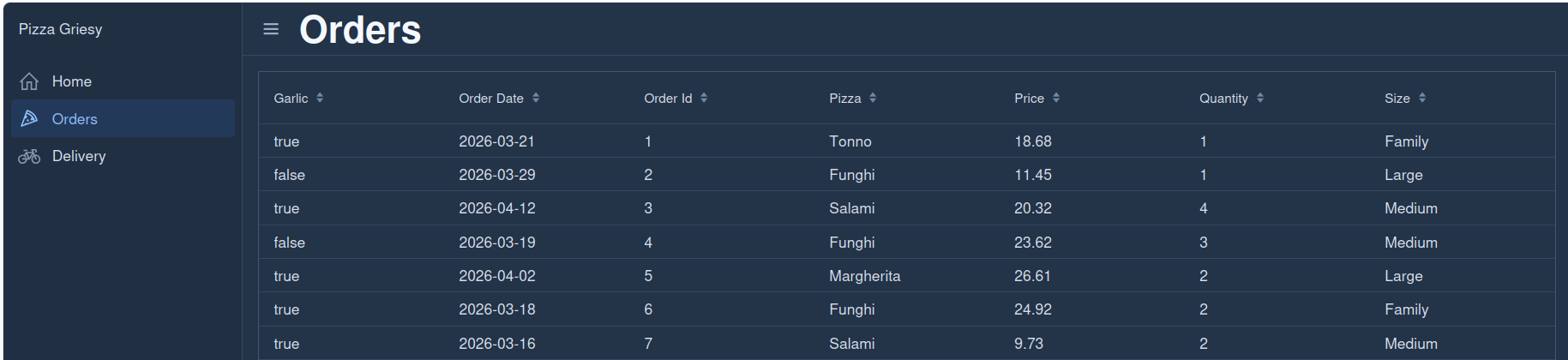
A simple Grid in Vaadin is the easiest way to show data as a table without any customization.
You just tell Vaadin:
which class to display
what data to show
And Vaadin does everything automatically.
Service
PizzaOrderService.java
    public ArrayList<PizzaOrder> findAll (){
        ArrayList<PizzaOrder> copy = new ArrayList<PizzaOrder>(orders);
        return copy;
    }
Return all pizza orders, but as a copy of the list.
Step-by-step explanation
ArrayList<PizzaOrder> copy = new ArrayList<PizzaOrder>(orders);creates a new ArrayList
copies all elements from
ordersinto it
return copy;- returns the new list instead of the original one
Why not return orders directly?
return orders;then outside code could do:
service.findAll().clear();❌ This would delete your internal data!
Why this version is better
return new ArrayList<>(orders);✅ protects your internal list
✅ prevents external modification of the original list
Important detail
This is a shallow copy:
the list is new ✅
but the objects inside are the same ❗
So:
PizzaOrder p = service.findAll().get(0);
p.setSize("XL");
👉 still changes the original object
Simplest possible Grid
public class OrdersView extends VerticalLayout {
    private final Grid<PizzaOrder> grid = new Grid<>(PizzaOrder.class, true);
    private final PizzaOrderService pizzaOrderService;

    public OrdersView(@Autowired PizzaOrderService pizzaOrderService) {
        this.pizzaOrderService = pizzaOrderService;
        setSpacing(true);

        setSizeFull();
        grid.setSizeFull();
        add(grid);
        reload();
    }

    private void reload() {
        grid.setItems(pizzaOrderService.findAll());
    }
}
Let’s go through your code step by step in a simple way 👇
Class definition
public class OrdersView extends VerticalLayout {👉 OrdersView is a UI class (View) in
Vaadin
👉 It extends VerticalLayout → components are arranged
from top to bottom
Grid field
private final Grid<PizzaOrder> grid = new Grid<>(PizzaOrder.class, true);👉 Creates a table (Grid) to display
PizzaOrder objects
PizzaOrder.class→ tells Vaadin what data type to showtrue→ automatically shows all fields as columns
✔ No need to define columns manually
Service field
private final PizzaOrderService pizzaOrderService;👉 This is your service (business logic layer)
👉 It provides the data (list of orders)
Constructor (important part)
public OrdersView(@Autowired PizzaOrderService pizzaOrderService) {👉 Spring gives you the PizzaOrderService
automatically
Equivalent idea:
new OrdersView(new PizzaOrderService());Inside the constructor:
this.pizzaOrderService = pizzaOrderService;👉 Saves the service in the class so you can use it later
Spacing
setSpacing(true);👉 Adds spacing between UI elements
Full screen size
setSizeFull();
grid.setSizeFull();
👉 Makes the layout and grid use full screen size
add
add(grid);👉 Adds the grid to the UI
👉 Now it becomes visible
reload
reload();👉 Loads data into the grid
reload() method
private void reload() {
    grid.setItems(pizzaOrderService.findAll());
}
👉 This is the key logic:
Calls the service:
pizzaOrderService.findAll()→ returns all orders
Sets data into the grid:
grid.setItems(...)→ grid displays the data
What happens when the view opens?
Step-by-step:
Vaadin creates
OrdersViewSpring injects
PizzaOrderServiceConstructor runs
Grid is added to layout
reload()is calledData is loaded into the grid
User sees a table with pizza orders
Domain
Add a no-argument constructor for JPA
Because of @Entity, JPA requires a constructor without
arguments.
Current constructor:
    public PizzaOrder() throws PizzaOrderException {
        setOrderId();
        setOrderDate(LocalDate.now());
        setPizza("Margherita");
        setSize("Large");
        setPrice(14.0);
        setQuantity(1);
        setGarlic(true);
    }
is not good for JPA, because JPA expects a simple no-arg constructor.
Use:
public PizzaOrder() {
}
OR
@NoArgsConstructorIf you want default values, it is better to set them elsewhere, not in the JPA default constructor.